WhatsApp marketing has become one of the most efficient ways to reach audiences at a time when brands are competing across multiple platforms.
With WhatsApp, you can skip the timelines and algorithms of social media sites and cut straight to someone’s unread messages.
In 2025, WhatsApp marketing is just as crucial to successful audience engagement as mastering Facebook, Instagram, X, or any other social site.
And there are plenty of tools out there to help you along the way. Consider what you need from a marketing tool on WhatsApp, and check out the tools below to find a match.
WhatsApp marketing software:
Why WhatsApp marketing tools matter in 2025
Before we look at the types of WhatsApp marketing software available, it’s important to understand why they’re needed.
WhatsApp has matured from a support side‑channel into a full‑funnel medium: discovery via ads that click to WhatsApp, ongoing nurture with approved templates, and conversion through guided chats, rich media, and in some markets, payments.
There’s a lot going on across WhatsApp these days, so teams need marketing software that can:
- Unify inboxes: Work from one place across WhatsApp and other networks, with assignment, service level agreements (SLAs), and analytics.
- Automate responsibly: Channel conversations, trigger bot responses, and send approved message templates 24/7, without losing context when a human steps in.
- Publish: Schedule and send messages to your contact book.
- Advertise: Run Click-to-WhatsApp Ads (CTWA) campaigns from your social ad platform and measure how many conversations (and revenue) those ads drive.
- Stay compliant: Keep up with template rules and per‑message pricing (crucial in 2025 as WhatsApp shifts to a different pricing model).
- Respect privacy by design: Understand when WhatsApp chats are end‑to‑end encrypted and how optional hosting/AI services change what users see in chat.
Top WhatsApp marketing tools in 2025
Now let’s take a look at these top-performing WhatsApp marketing tools that offer WhatsApp marketing options alongside other functionalities across the digital and social landscape.
Quick Note: WhatsApp has a “24-hour window” rule, where brands can reply to a customer message with a personalized message, without using a pre-authorized template, if they do so within 24 hours. If the “24-hour window” passes, you’ll need to use a template response to engage customers.
1. Brandwatch
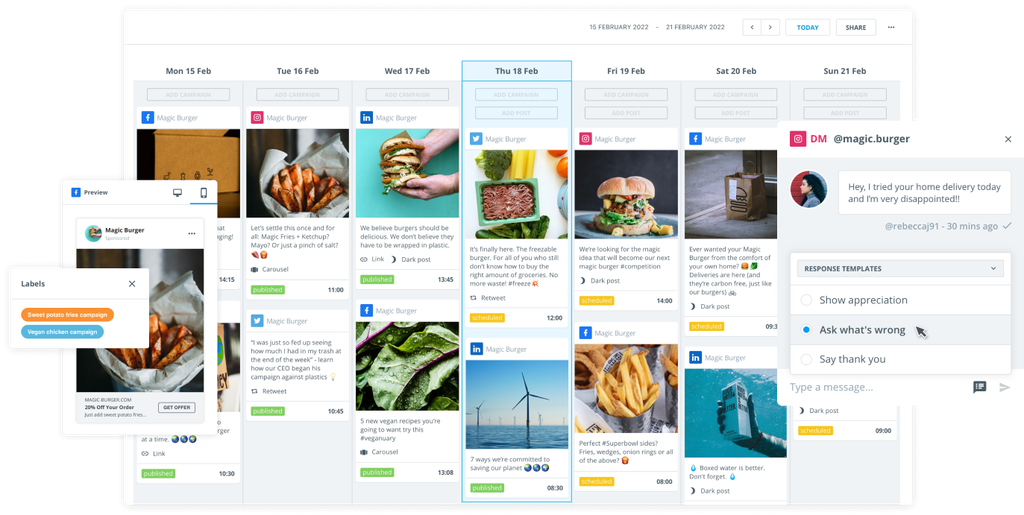
Brandwatch Social Media Management brings WhatsApp into the same workspace you use for Facebook, Instagram, X, LinkedIn, TikTok, and more.
You can swiftly connect a WhatsApp Business account and manage customer chats from one inbox. Use WhatsApp message templates after the 24‑hour window and build Click‑to‑WhatsApp campaigns.
Brandwatch is an enterprise-grade platform designed to manage all your social media activity in one place. Use social listening to understand your online audiences and develop communication strategies to speak to various customer personas.
Armed with this research, you’ll be able to speak to WhatsApp audiences more effectively and handle customer care issues as they come in.
- Unified customer care: Work from a single inbox across social channels, including WhatsApp.
- Team collaboration: Channel WhatsApp conversations to the right agents or team members to ensure collaborative responses.
- Template‑based follow‑ups: Re‑open conversations outside the 24-hour window with approved templates.
- CTWA inside your ad stack: Build and track click-to-WhatsApp ads to connect spend with conversations.
- Data network coverage: Manage WhatsApp alongside other supported networks in one platform.
- Security and compliance: Enterprise‑grade governance with WhatsApp’s encryption at the channel level.
- Official partnership: Brandwatch is an official Meta Business Partner, meaning the software helps brands develop effective marketing strategies across Meta’s products (WhatsApp, Facebook, Messenger, and Instagram).
2. Sprinklr
Sprinklr focuses on ad provision and communication on WhatsApp. Its ad composer supports Facebook/Instagram ads that click to WhatsApp, letting you run paid campaigns that open a chat thread and attribute conversations to ads.
Teams can coordinate customer care across multiple social channels.
- CTWA creation and targeting: Build and manage click-to-WhatsApp ads campaigns inside Sprinklr Ads.
- Automation and analytics: Orchestrate journeys and analyze conversation volumes from ads.
- Omnichannel service: Coordinate care across channels with governance and reporting.
3. Emplifi
Emplifi supports WhatsApp customer care and communications. You can reply to users’ messages with approved templates after 24 hours and manage WhatsApp profiles like other owned channels.
- Template management: Pull approved templates from Meta and send after 24 hours.
- Care workflows: Apply answer templates with placeholders across channels.
- Policy adherence: Follow the 24‑hour free‑form rule and use templates afterward.
4. Hootsuite
Hootsuite’s social inbox connects WhatsApp accounts, so agents can receive and respond to messages alongside other social channels.
The software also offers interactive voice response (IVR) deflection that moves callers into WhatsApp messaging and reduces hold times.
- Unified inbox: Channel and collaborate on WhatsApp conversations in one place.
- Deflect to WhatsApp: Shift phone calls into live chats via IVR deflection.
5. Khoros
Khoros provides WhatsApp templated replies to increase automation on the platform and deliver a centralized, standardized level of customer care.
It’s also possible to deflect phone calls to WhatsApp using additional software – handy for contact centers shifting to messaging.
- Template replies: Use approved templates beyond the 24-hour window.
- Phone‑to‑chat: Reduce phone calls by offering WhatsApp messaging as an option.
6. Sprout Social
Sprout integrates WhatsApp into its centralized inbox and provides a Bot Builder for automated workflows across channels.
Sprout supports text‑based templates (media/interactive templates are yet to drop), which is useful for planning messaging.
- Centralized care: View and respond in the Smart Inbox with filtering and tagging.
- Automation: Build chatbots for FAQs and routing; handoff to agents when needed.
7. Salesforce
Salesforce offers WhatsApp in its Service Cloud for real‑time customer messaging and in Marketing Cloud for orchestrating large‑scale communications.
If your organization already lives in Salesforce, then this path centralizes conversations with cases, journeys, and analytics.
You can also integrate Salesforce and Brandwatch for a 360-degree marketing and CRM solution.
- Unified service: Tie WhatsApp to case workflows in Service Cloud.
- Campaign orchestration: Coordinate WhatsApp with email, SMS, and push notifications.
8. HubSpot
HubSpot connects WhatsApp to a user’s shared inbox, giving sales and service teams a single place to view and respond to messages while linking chats to CRM records.
- Shared inbox: Manage WhatsApp alongside other channels.
- CRM context: Maintain timelines and trigger automations.
9. Zendesk
Zendesk lets you add WhatsApp as a channel, so agents can reply from Agent Workspace with conversation history, macros, and reporting baked in.
- Channel setup: Add numbers, rules, and automations to your WhatsApp channel.
- Agent experience: Use one workspace for tickets, social direct messages (DMs), and chat.
10. Intercom
Intercom supports inbound and outbound WhatsApp messaging. For product‑led teams already using Intercom bots, tours, and help center, it’s a straightforward way to add WhatsApp to your customer communications.
- Inbound support: Receive and reply in your Intercom inbox.
- Outbound campaigns: Send proactive marketing messages to eligible audiences (template rules apply).
11. Twilio
Twilio offers a mature WhatsApp Business API with software development kits (SDKs) and guides to help you get established.
It’s designed to aid WhatsApp Business conversations and comes with account verification software, so you can fight fraud.
- APIs and SDKs: Program messages with clear quickstarts and docs.
- Templates: Manage approvals and delivery/status callbacks.
- Migration guidance: Plan around 2025 template changes.
12. Infobip
Infobip provides both WhatsApp API access and UI‑based tools to deliver swift conversation solutions. You can build chatbots or engage directly with customers, and orchestrate campaigns/journeys all in one place.
- All‑in‑one: API, chatbot, contact center, and campaign orchestration.
- Commerce readiness: Respond to abandoned carts, send order updates, and deliver timely promotions.
13. Bird
Bird’s API groups WhatsApp channel IDs under “channel groups” and supports batch sending (up to 100 messages per request), useful for campaigns with controlled throughput. Its primary purpose is to ensure swift, accurate messaging with customers.
- Channel groups: Organize multiple numbers/devices into groups, making batch messages easier to send.
- Unified API: Consistent models across all WhatsApp channels.
14. WATI
WATI allows users to focus on broadcast campaigns, automation, and CRM‑style contact management. The tool enables bulk messages, and users have access to campaign examples/templates.
- Broadcast manager: Segment audiences and send approved templates at scale.
- Template guidance: Get practical examples and timing tips for your template messages.
- CRM usage: Option to re-run customer engagement efforts and send promotions.
15. 360dialog
360dialog boasts a good reputation for having clean API access, a rapid onboarding process, and a partner‑first program. 360dialog’s docs track per‑message pricing changes and Cloud API webhook updates relevant to engineering teams.
- Direct access: Low‑friction connectivity to the Cloud API.
- Docs for devs: WABA basics and partner tooling.
16. Gupshup
Gupshup offers Self‑Serve WhatsApp API access and publishes detailed notes on PMP (per‑message pricing) changes. This is particularly useful in 2025 as Meta implements its own pricing changes.
- Self‑serve onboarding: Fast setup for campaigns and notifications.
- Pricing updates explained: Message‑level charge changes and webhook payloads.
17. Vonage
Vonage supports the WhatsApp API and offers conversational tools that enable end‑to‑end shopping experiences in WhatsApp’s chat. Utilize AI bots to oversee parts of the customer journey and request users' locations, enabling you to provide more relevant information.
- Location sharing: Request user location to send more accurate information.
- Quick onboarding: Embedded sign‑ups to accelerate WABA setup.
- Data collection: Gather customer data from WhatsApp in one centralized data hub.
18. Sinch
Sinch provides Conversation API support for WhatsApp, with implementation guides and blog content. It’s a useful tool for those seeking to engage in two-way conversations and send rich messages (photos, gifs, etc) alongside standard customer-related processes.
- Channel setup: Clear steps to configure WhatsApp.
- Strategy insights: Discover where WhatsApp fits among your other channels.
- Innovative communication: Speak to customers one-on-one or send batch messages.
How to choose the right WhatsApp marketing tool
Using a WhatsApp marketing tool usually comes down to two things: customer care and ads.
Within customer care, there’s a vast range of issues to consider when choosing a tool. You likely need software that offers a unified inbox, collaborative team workflows, and template responses beyond the 24-hour window.
With ads, it’s imperative you have a platform that can develop the right messages, contact the right audiences, and instigate the correct follow-ups. Whether it’s sales, sign-ups, brand awareness, or anything else, your WhatsApp ad campaigns need to deliver return on investment (ROI), which makes data tracking imperative, too.
More than that, your brand probably has other social media platforms, its owned media (such as your website), and relationships with PR professionals. Your WhatsApp marketing very likely aligns with other aspects of your business.
That’s why, when choosing WhatsApp marketing software, it’s important to think about where your tool sits within your wider business operations.
Is WhatsApp marketing the sole way you plan to contact customers? If so, a small-scale messaging and management tool may suffice. Or, are you looking to add WhatsApp marketing to your already-expansive activity? If that’s the case, a tool like Brandwatch Social Media Management is worth exploring.
Policy and platform trends that affect your plan (2025)
A few changes have come into effect in 2025 that may alter your WhatsApp marketing strategy. These include:
- Per‑message pricing: This is now standard in WhatsApp, and some categories may have volume tiers. See Meta’s pricing guidance for more information.
- AI expansion: Meta is expanding its artificial intelligence (AI) across WhatsApp, with the company actively exploring a new Business AI product in the future.
- Customer calling: WhatsApp is rolling out more effective customer communications, with larger businesses able to call customers once they’ve given their permission to be contacted.
FAQs: WhatsApp marketing tools (2025)
1) What counts as a “WhatsApp marketing tool”?
Any software that helps a business acquire, engage, or retain customers via WhatsApp may be considered a WhatsApp marketing tool. That includes enterprise social suites (care + ads), CRM/service platforms (cases + automation), and business service providers/conversation platforms (API access, templates, broadcasts, bots). Many teams use a combination, for example, Brandwatch care/ads and a business service provider like Twilio for developer control.
2) Do WhatsApp messages stay end‑to‑end encrypted when I use these tools?
End‑to‑end encryption protects messages in transit. If a business manages/stores messages itself or uses the WhatsApp Business app, chats are treated as end-to-end encryption; if a business opts for Meta hosting/AI, WhatsApp shows a notice, and those chats are not treated as end-to-end encryption.
3) What’s the difference between click-to-WhatsApp ads and template broadcasts?
Click-to-WhatsApp ads drive new conversations from Meta platforms, Facebook, and/or Instagram directly into a WhatsApp thread. Template broadcasts are proactive messages to opted‑in contacts outside WhatsApp’s 24‑hour window using approved templates.
4) How did 2025 pricing changes affect WhatsApp budget planning?
WhatsApp marketing budgets shifted from “cost per conversation” to “cost per delivered message” when Meta changed its pricing model for WhatsApp in 2025. You now need finer controls over audience size, send cadence, and message category.
Quick Note: If your growth model relies on ads driving chats and ultimately sales, prioritize platforms that enable you to build and track click-to-WhatsApp ads within the same care workflow environment. Brandwatch supports building these ads in Advertise.
Start WhatsApp marketing today
In 2025, the best WhatsApp marketing tools do more than send messages; they connect paid, owned, and service moments into a continuous, measurable conversation.
The right fit depends on what you need WhatsApp marketing software for:
- Choose an enterprise suite if you need inbox, automations, and click-to-WhatsApp ads in one place across social media sites (not just WhatsApp).
- Choose a CRM/service suite if case management and data unification are paramount.
- Choose a platform that offers API access if you need broadcasts, templates, and developer‑level control at scale.
Each solution here has strengths; the key is alignment with your stack, region, and goals. As your WhatsApp channel and brand evolve, the ability to adapt, measure impact, and respect user privacy will determine your success.
Of course, you can bring these tools together. Combining Brandwatch and Salesforce means you cover conversation management and click-to-WhatsApp ads alongside customer relationship management.
Discover more by booking a demo with Brandwatch today.